
Developing Flash Applications with Flex Builder
I miss programming. For years, I developed software for large companies, first using Lotus Notes and then Macromedia Flash. I have spent the past three years in a totally nonprogramming job, developing Web sites, writing whitepapers and otherwise doing nontechnical things. I like writing, but I miss programming. I wanted to get back into development, and as a Linux Journal writer, I wanted to use free software if possible. The thing is, my background is all in not only proprietary but also highly specialized software. I have never programmed in C or Java or Perl or any of the other popular general-purpose languages. I certainly could learn one, but I would prefer not to start from scratch with a whole new system at this stage of my career.
One way forward was to create Flash applications in Flex. Flash originally was created as an animation player. Its scripting language, ActionScript, originally was a way to script object animation, but it has developed into a full-featured object-oriented programming environment for general-purpose applications. It is an implementation of the ECMAScript 4 draft, meaning that it is compatible with the newest JavaScript engines. However, many traditionally trained developers find Flash's animation-oriented timeline development system confusing and unfamiliar. The solution was the development of Flex, which allows programmers to create Flash applications using more standard tools and the more familiar metaphor of drawing controls on a form and assigning them behaviors.
After Adobe bought Macromedia, it released the Flex SDK under the Mozilla Public License, so it now is possible to develop Flash applications using entirely free software. It also has released an alpha version of its Eclipse-based Flex Builder development environment for Linux. Flex Builder is released under a proprietary license.
Flex applications also can be defined using MXML, an XML dialect that is used to lay out the user interface and other aspects of the program, such as data bindings. Behaviors still are defined using ActionScript.
Flash applications generally run in the browser. They offer many of the advantages of AJAX or Silverlight applications, including a stateful client that can update specific items without reloading the entire page, and the Flash Player sandboxes applications in much the same way that a Java applet is restricted for security reasons.
Another innovation, AIR (Adobe Integrated Runtime) lets applications run off-line. AIR lets ActionScript developers create true freestanding programs that do not require a Web browser. However, they still are restricted by the Flash “sandbox”, which limits what changes can be made on the local system. AIR apps also can include HTML and JavaScript.
Perhaps the two best-known AIR applications are the Pandora Internet radio player and TweetDeck, which streamlines the Twitter experience. Both work on Linux.
In this article, I demonstrate how to create a simple Flash application using Adobe Flex Builder on a Linux system. In a follow-up article, I'll move on to totally open-source development using Project Sprouts.
Flex is an Eclipse-based environment. In order to use it, you must have certain prerequisite software installed: Eclipse 3.3.x, Sun JRE 1.5 or newer and Mozilla Firefox 3.0.
Note that the system requirements refer specifically to Eclipse 3.3. If you use a higher version, installation will succeed, but Eclipse will fail to open code editors. I installed version 3.3.2 from eclipse.org (see Resources) in my $HOME directory. You can install 3.3 alongside 3.5 on the same computer, as long as you start version 3.3 to use Flex. Simply untar the download and place it anywhere in the filesystem. I put it in $HOME/eclipse.
I was able to use Flex Builder with Mozilla Firefox version 3.5, however, rather than the called-for 3.0 without problems. One Firefox tip: I use the NoScript plugin. At first, I thought the context-sensitive help in Flex Builder wasn't working, but it turns out that I had to allow scripts from 127.0.0.1:51296.
Also, note that you must install the Sun JRE. GCJ will not work with Flex.
To make debugging work, you must download and install the debugging version of the Flash Player (see Resources). Amusingly, when you try to run Adobe's installer on Ubuntu 9.10 (Karmic Koala), it complains because you don't have libc6 “higher” than 2.3. In fact, Karmic ships with version 2.10 (read as “2 dot 10”), which is higher than 2.3 in version-speak but not in normal numbering. I edited the script to remove the version check by commenting out these lines:
#GLIBCSTATUS=`check_glibc`
#case $GLIBCSTATUS in
#  invalid-glibc)
#    exit_glibc
#    ;;
#esac
With those edits, the install completed without further problems.
You can download the Flex alpha from Adobe's Web site (see Resources), and you need to create a free account first. Once you have it downloaded, do a chmod u+x on the file and run the downloaded file to install. Flex Builder uses a Windows-style graphical wizard installer. I installed into /home/carlf/AdobeFlexBuilderLinux, which meant I did not need to become superuser to complete the installation.
To use Flex Builder, simply start Eclipse. Being old-school, I did this by typing ./eclipse/eclipse & in a GNOME terminal (Figure 1).
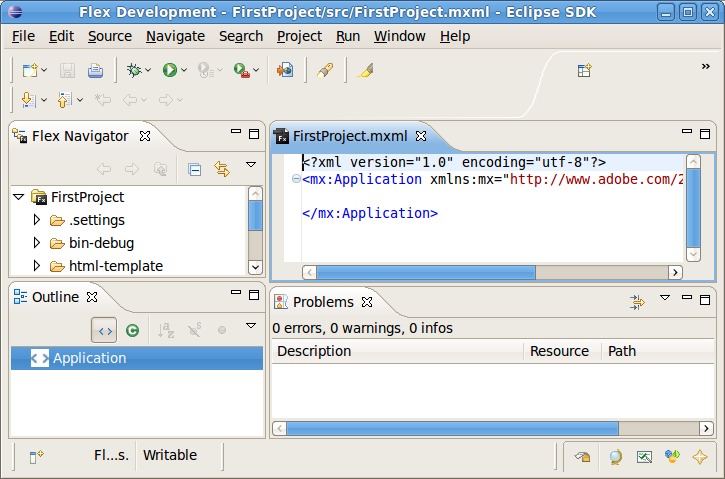
Figure 1. Flex Builder
The first time you run Eclipse after installing Flex Builder, you must create a new Workspace. Simply click File→Switch Workspace→Other and create a new folder.
Flex Builder for Linux, as an alpha, is missing several features present in the Windows and Mac versions:
Design View
States View
Refactoring
Data Wizards
Cold Fusion Data Services Wizard
Web Services Introspection
Profiler
Depending on the type of project you are planning, these features may be either critical or unimportant.
Because this was my first experience with Eclipse, I took time to review the Eclipse tutorials before closing the Welcome screen. To switch from the default Java development environment to Flex, click Windows→Open Perspective→Other, and select Flex Development. Now, create a Flex project by clicking File→New→Flex Project. I chose to create a browser-based SWF file and named it “FirstProject”.
For this first simple application, I decided to create a simple Internet quiz that asks the user some questions, then supplies a “Webcomics IQ” score (I'm a big fan of Webcomics). This let me avoid having to worry about server database access on my first project. For this project, I need to use MXML to draw a simple form, which contains a question (text field) and four possible answers (radio buttons), along with a Next button. When the user clicks Next, the next question is displayed in the text field. After the last question, the score is displayed.
Because Flex Builder for Linux lacks a GUI painter (the Design View is absent), I created the components by typing MXML code into the editor. First, I write the text of the first question.
Listing 1. Quiz Program
<mx:Application
                layout="absolute">
  <mx:TextArea width="75%" height="75%">
    <mx:text>
      Question 1: Which strip is this grouchy but
                  good-hearted fighter the star of?
    </mx:text>
  </mx:TextArea>
</mx:Application>
When run, the program looks like Figure 2.
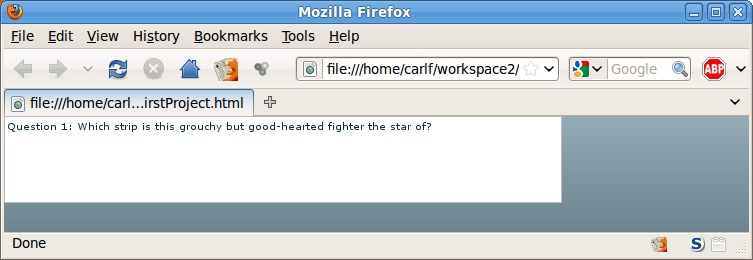
Figure 2. First Run of the Quiz Program as Seen in Firefox
As you see, the text is very small. You can set the text size by using htmltext instead of text. I also corrected the problem that the text is too close to the borders of the movie by adding padding, I assigned an ID (name) to the control, so I can refer to it in scripts, and I made it non-editable, which then gives us Listing 2.
Listing 2. Quiz Program with Font and Layout Fixes
<?xml version="1.0" encoding="utf-8"?>
<!--Example for LJ article. -->
<mx:Application
                layout="absolute">
  <mx:TextArea width="75%" height="75%"
               paddingTop="10" paddingBottom="10"
               paddingLeft="10" paddingRight="10"
               id="Question" editable="false">
    <mx:htmlText>
    <![CDATA[
      <font size="+3" face="Arial">
        <b>
          Question 1: Which strip is this grouchy but
                      good-hearted fighter the star of?
        </b>
      </font>
    ]]>
    </mx:htmlText>
  </mx:TextArea>
</mx:Application>
I still need to add the answer selections as radio buttons and a Next button. In Listing 3, I have added our first bit of ActionScript, a function that evaluates whether the correct answer is selected and gives immediate feedback by way of a dialog box. Anything other than MXML in a project file is best kept inside CDATA tags, which prevent Flex from parsing it as XML. This applies to both ActionScript and HTML. ActionScript also can be stored in external files and loaded at runtime or during compilation.
Listing 3. Quiz Program with First ActionScript Code
<?xml version="1.0" encoding="utf-8"?>
<!--Example for LJ article. -->
<mx:Application
                layout="vertical"
                backgroundColor="#FFFFFF">
  <mx:TextArea id="Question"
               width="100%" height="15%"
               paddingTop="10" paddingBottom="10"
               paddingLeft="10" paddingRight="10"
               editable="false"
               backgroundColor="#FFFFFF" borderColor="#FFFFFF">
    <mx:htmlText>
    <![CDATA[
      <font size="+4" face="Arial">
        <b>
          Question 1: Which strip is this grouchy but
                      good-hearted fighter the star of?
        </b>
      </font>
    ]]>
    </mx:htmlText>
  </mx:TextArea>
  <mx:VBox paddingLeft="150"
           backgroundColor="#FFFFFF" width="100%">
    <mx:RadioButton id="a1" groupName="Answers"
                    label="Belkar Bitterleaf"
                    width="400" paddingRight="20" />
    <mx:RadioButton id="a2" groupName="Answers"
                    label="Gilgamesh Wulfenbach"
                    width="400" paddingRight="20" />
    <mx:RadioButton id="a3" groupName="Answers"
                    label="Roy Greenhilt"
                    width="400" paddingRight="20" />
    <mx:RadioButton id="a4" groupName="Answers"
                    label="Frank Mangle"
                    width="400" paddingRight="20" />
    <mx:Button id="nextButton"
               label="Next" click="parseanswers();" />
  </mx:VBox>
  <mx:Script>
  <![CDATA[
  public function parseanswers(): void
  {
      import mx.controls.Alert;
      if (a3.selected) {
          Alert.show('Yes, the answer is ' + a3.label,
                     'Right!', mx.controls.Alert.OK);
      }
      else {
          Alert.show('Sorry, no.', 'Wrong', mx.controls.Alert.OK);
      }
  }
  ]]>
  </mx:Script>
</mx:Application>
Running the program now produces a single question, and clicking Next produces a simple message box (Figure 3).

Figure 3. Quiz Program with Answer-Checking
The dialog and other controls don't look “standard” for most operating systems, and developers will want to customize them. Flex and Flash support various “skinning” techniques that make it simple to change the appearance of controls, but those are beyond the scope of this article.
Obviously, this version of the quiz is only for testing purposes. It has one question and no provision for tabulating results. Now, it's time to create more questions. Because I'm deliberately not connecting to a server-side database for this article, I simply declared an array of data directly in the program's code.
It's a peculiarity of ActionScript (like its parent, ECMAScript) that it doesn't directly support multidimensional arrays. The workaround is to declare an array of arrays, as shown in Listing 4.
Listing 4. Quiz Program with More Questions
<?xml version="1.0" encoding="utf-8"?>
<!--Example for LJ article. -->
<mx:Application
                layout="vertical"
                backgroundColor="#FFFFFF">
  <mx:TextArea id="Question"
               width="100%" height="15%"
               paddingTop="10" paddingBottom="10"
               paddingLeft="10" paddingRight="10"
               editable="false" backgroundColor="#FFFFFF"
               borderColor="#FFFFFF"
               creationComplete="initApp();">
    <mx:htmlText>
    <![CDATA[
      <font size="+4" face="Arial">
        <b>
          Question 1: Which strip is this grouchy but
                      good-hearted fighter the star of?
        </b>
      </font>
    ]]>
    </mx:htmlText>
  </mx:TextArea>
  <mx:VBox paddingLeft="150"
           backgroundColor="#FFFFFF" width="100%">
    <mx:RadioButtonGroup id="Answers" />

    <mx:RadioButton id="a1" groupName="Answers" value="1"
                    label="Belkar Bitterleaf"
                    width="400" paddingRight="20" />
    <mx:RadioButton id="a2" groupName="Answers" value="2"
                    label="Gilgamesh Wulfenbach"
                    width="400" paddingRight="20" />
    <mx:RadioButton id="a3" groupName="Answers" value="3"
                    label="Roy Greenhilt"
                    width="400" paddingRight="20" />
    <mx:RadioButton id="a4" groupName="Answers" value="4"
                    label="Frank Mangle"
                    width="400" paddingRight="20" />
    <mx:Button id="nextButton"
               label="Next" click="parseanswers();" />
  </mx:VBox>
  <mx:Script>
  <![CDATA[
  import mx.controls.Alert;
  // Define here to make variables global.
  var currentQuestion:int = 0;
  var totalRight:int = 0;
  // Initialize the array of questions.
  //   - First sub-array is question text
  //   - Second through fifth are possible answers
  //   - Sixth is the correct answer for that question.
  var questions:Array = new Array(
      new Array("This grouchy but ... Order of the Stick.",
                "In Kevin and Kell, why ... secretaries?",
                "Which of these strips is NOT a stick-figure comic?"),
      new Array("Belkar Bitterleaf",
                "High metabolism means lots of work done.",
                "Questionable Content"),
      new Array("Gilgamesh Wulfenback",
                "Hollow bones mean no carpal tunnel",
                "No Time for Life"),
      new Array("Roy Greenhilt",
                "Excellent language skills of parrots",
                "xkcd"),
      new Array("Frank Mangle",
                "Flight lets them double as messengers",
                "Cyanide and Happiness"),
      new Array(3,2,1));

  private function initApp(): void
  // Initializes the first question, removing the default text
  // that's there when the controls are created
  {
      // testing
      Question.text=questions[0][currentQuestion];
      a1.label=questions[1][currentQuestion];
      a2.label=questions[2][currentQuestion];
      a3.label=questions[3][currentQuestion];
      a4.label=questions[4][currentQuestion];
  }
  public function parseanswers():void
  // Function runs whenever the user clicks the Next button.
  // Updates the score and puts up the new question, except on
  // the final question, where it displays the user's final tally.
  {
      if (Answers.selectedValue == questions[5][currentQuestion]) {
          totalRight++
      }
      // OK, Next was pressed so it's time to update the
      // screen. Test whether this was the last question,
      if (currentQuestion >= 2) {
          // That was the last question, time to report
          // results. For simplicity I will use
          // the Alert function here
          Alert.show('You got '+ totalRight
                     + ' questions right out of '
                     + 3, 'Score', mx.controls.Alert.OK);
          // Since the quiz is over, I disable all the
          // controls on the screen. In a polished
          // version, I will handle the end of quiz by switching
          // to a different Flash file showing the score only.
          Question.enabled=false;
          Answers.enabled=false;
          nextButton.enabled=false;
      }
      else {
          // OK, that wasn't the last question, so update
          // the question, all four answers and
          // increment currentQuestion
          currentQuestion++;
          Question.text=questions[0][currentQuestion];
          a1.label=questions[1][currentQuestion];
          a2.label=questions[2][currentQuestion];
          a3.label=questions[3][currentQuestion];
          a4.label=questions[4][currentQuestion];
          Answers.selection = null;
      }
  }
  ]]>
  </mx:Script>
</mx:Application>
I made my question arrays and index variable global. I know it's frowned on, but it's convenient. Global variables must be defined outside all functions, so here I defined them immediately at the beginning of the code, before any function definitions.
In the application definition, I added the MXML creationComplete="initApp();", which says to run the function initApp after the form is initialized. initApp replaces the default text of the question and answers with the contents of the first column of the array.
For this article, the application is complete (Listing 4 shows the full, final code).
Flex is commercial software, totally nonfree (as in speech). It retails for $249. I worked with the trial version, which is free as in beer. It's labeled an alpha, but it worked extremely well. It literally never crashed. The missing features listed above didn't affect me much, but I'm not an experienced Eclipse or Flex user who might be depending on those things.
Adobe hasn't announced any plans to release Flex Builder 4 for Linux. However, it did just extend the free license of the Flex 3 alpha for more than a year. I was intrigued to find a Flex Builder project at Google Code, fb4linux (see Resources). A programmer is trying to single-handedly convert the Windows version to run on Linux. I installed it, and it seems to work surprisingly well. Unfortunately, the “More info” link leads to sole developer eshangrao's personal site, which is written in Chinese. Because I can't read Chinese, I can't say much more about it. The project is distributed with the original Adobe license and still requires a license code from Adobe to work.
In my next article on this discussion of Linux-based Flash/Flex development, I will evaluate Sprouts, a Ruby-centered development environment. Unlike Flex Builder, Sprouts is released under an open-source license (the MIT license). Sprouts is a command-line-only compiler and debugger, built around the Rake build language. I will give an overview of using Sprouts, how to port Flex Builder projects into the Sprouts environment, and I'll also finish the work on my Webcomics quiz, reading the questions from a server-based database and improving the appearance of the screens.
Resources
Adobe AIR: www.adobe.com/products/air
Eclipse Platform Downloads (use 3.3.2 for Flex Builder 3 alpha): archive.eclipse.org/eclipse/downloads/index.php
Debug Version of Flash Player 10: download.macromedia.com/pub/flashplayer/updaters/10/flash_player_10_linux_dev.tar.gz
Flex Builder 3 Alpha for Linux (also includes installation instructions): labs.adobe.com/technologies/flex/flexbuilder_linux
Flex Builder 4 for Linux: code.google.com/p/fb4linux
Project Sprouts: projectsprouts.org
Flex Examples (very helpful): blog.flexexamples.com
Having been a programmer, writer, trainer, teacher and several other things, Carl Fink is not what you'd call a specialist. You can read his blog at nitpicking.com.


