
Web Application Testing with Selenium
Web 2.0 may pale in comparison to the days of the dot-com bubble and Web 1.0 from a financial point of view, but from a technical point of view, it's light-years ahead. As a Web developer, you find yourself designing more complex and more demanding Web applications than your bubble 1.0 predecessors ever dared to dream of. This is the fun part. The less fun part is trying to test those feature-rich applications. The prospect of manual testing does not thrill any developer, and the multitude of browsers you need to test with makes it an even bigger nightmare. Figure 1, which is based on the browser market-share statistics provided by Net Applications at the time of this writing, illustrates quite clearly the state of the browser war 2.0.
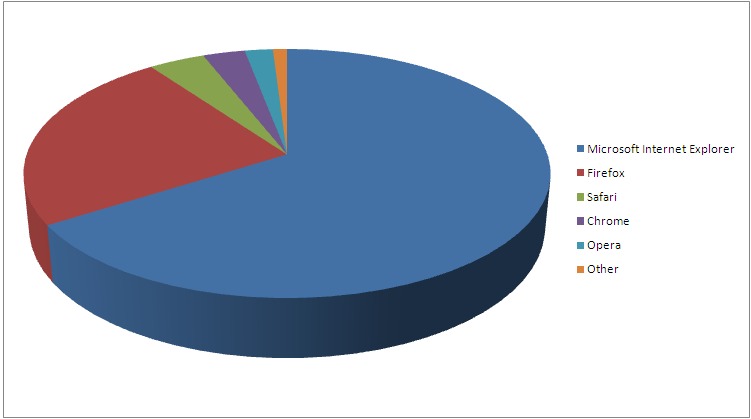
Figure 1. Browser Market Share
The breakdown is as follows:
Microsoft Internet Explorer: 66%
Firefox: 24%
Safari: 4%
Chrome: 3%
Opera: 2%
Other: 1%
Although estimates vary from different companies that monitor Web usage traffic, the conclusion is obvious: you no longer can afford to test with a single browser. And, note that Microsoft IE, which accounts for about 66% of the traffic, actually is three very different browsers: IE6, IE7 and IE8, which are known to render Web sites differently.
The situation is expected to get worse as mobile broadband Internet becomes cheaper and more common, adding more browsers you'll have to test with, sometimes with limited capabilities and nonstandard resolution.
The good news is that you are not facing this problem alone, and there are some advanced automatic Web application testing frameworks that can reduce the burden significantly.
Selenium is much more than an average Web site unit-testing application. It is actually a set of tools, consisting of the following:
Selenium Core
Selenium Remote Control (RC)
Selenium Integrated Development Environment (IDE)
Selenium Grid
Selenium Core provides basic testing functionality. It is implemented in JavaScript and can be deployed either standalone (in which case it has to be installed on the Web server) or more commonly, as part of Selenium RC, IDE or Grid, which all use Selenium Core engine. Figure 2 shows the relationships between the Core and other Selenium projects.
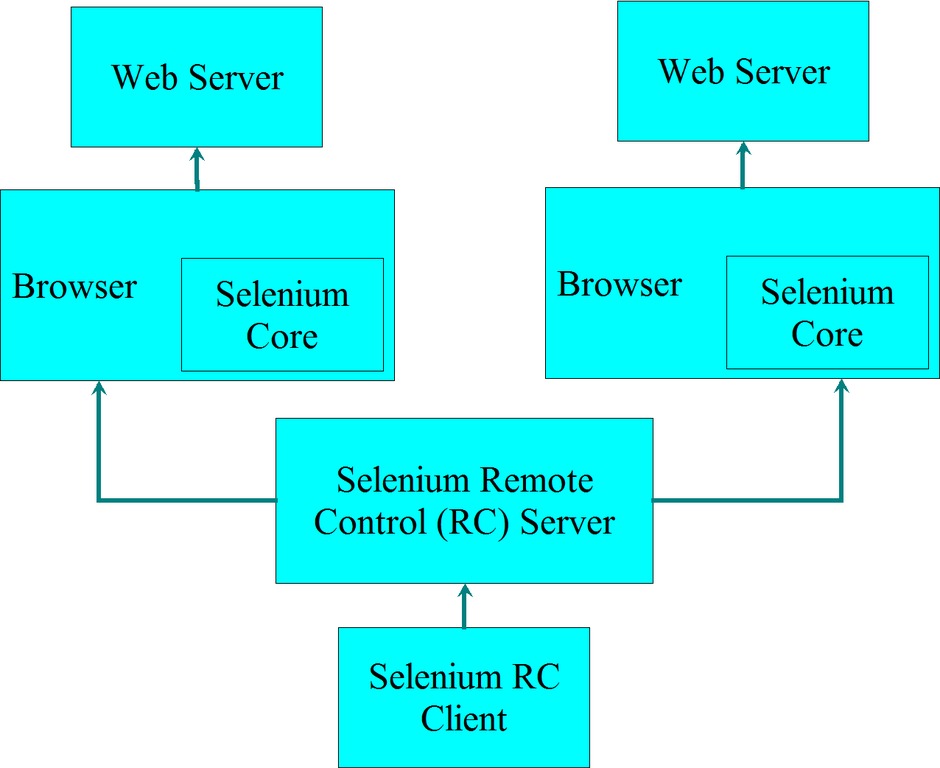
Figure 2. Selenium Architecture
Selenium RC is a Java-based command-line server that launches browsers and sends test commands to Selenium Core. You can write your tests, implemented as Selenium RC clients, in a variety of programming languages, such as Perl, Java, C# and others. If you are not afraid of some basic programming, this is the most powerful way to use Selenium.
Selenium IDE is a Firefox plugin that allows you to create tests using a graphical tool. These tests can be executed either from the IDE itself or exported in many programming languages and executed automatically as Selenium RC clients.
Selenium Grid solves the scalability problem by coordinating many Selenium RC instances, allowing you to run multiple tests in parallel on different machines.
I usually use Selenium RC, and I recommend it even to people with only a little bit of programming background. The API is simple, and the flexibility it provides is well worth the learning curve involved. RC consists of a server and client parts, which is a bit confusing, as the server has nothing to do with the Web server you are testing, but rather drives the Web browser used for testing. The server is a Java command-line application and should be executed as follows:
java -jar selenium-server.jar
The --help command-line switch will give you a full listing of supported options, but usually the defaults are sufficient. You also can invoke it programmatically from Java. The server will wait for client connections on port 4444 by default. The client can be written in one of the following languages: Perl, Python, PHP, Ruby, Java, C# and Erlang. The list is quite impressive. In fact, before I discovered Selenium, I was not aware that anybody outside Ericsson was using Erlang. The following sample Perl code shows a rather basic Selenium test that opens a Firefox browser and performs a search for the word Selenium using Google:
use strict;
use warnings;
use Test::WWW::Selenium;

my $sel = Test::WWW::Selenium->new(
                host          => "localhost",
                port          => 4444,
                browser       => "*firefox",
                browser_url   => "http://www.google.com",
                default_names => 1);
$sel->open("/");
$sel->type("q", "selenium");
$sel->click("btnI");
$sel->wait_for_page_to_load(60000);

print "$sel->get_title()\n";

$sel->stop();
The code above opens a new Selenium session, connects to the Selenium server running on the same machine as the client (the code in the listing) on port 4444, opens a Firefox browser, goes to the http://www.google.com URL, types the word selenium into the query field and clicks Google's “I'm Feeling Lucky” button. Both query and search elements are identified by their HTML element ID or name, q and btnI, respectively (examine the source code for Google's main page). The script waits for the page to load, prints the page title and shuts down the Selenium session.
Selenium Core is the heart of Selenium. It is a collection of JavaScript functions that are used by all Selenium projects, but it is rarely used on its own. If you take a look at the HTML source for the Web site under test (using View→Page source in Firefox or with whichever browser you told Selenium to execute), you will notice some additional JavaScript code that looks like the following:
<script
  type="text/javascript"
  src="/selenium-server/core/scripts/selenium-browserbot.js">
</script>
This is actually the Selenium Core code. The way Selenium “injects” itself into the Web page can vary (more on this later); however, when Selenium Core is used directly, this code has to be added to your HTML manually. Naturally, it requires access to the Web server that's serving the page, which is not always available. The biggest advantage of this mode is that it will work reliably with all browsers—something that other methods of using Selenium cannot guarantee.
Nevertheless, standalone Selenium Core is rarely used these days and may be deprecated in the future, so for the rest of this article, I concentrate on Selenium RC and IDE, which are the preferred methods of using Selenium.
Contrary to Selenium RC, for which you write your test cases using some programming language, the Selenium IDE allows you to develop your Selenium test cases in a graphical environment by simply interacting with the Web application under test as your users would. It probably is the easiest way to develop test cases. Selenium IDE is implemented as a Firefox plugin. The IDE not only records the Selenium commands that correspond to your interactions with the browser, but it also allows you to modify their arguments and add more commands to the recorded test case. The plugin has a context menu that allows you to select a UI (User Interface) element from the browser's currently displayed page and then select a Selenium command from a drop-down list, automatically adding relevant parameters according to the context of the selected UI element.
After installation, the IDE is accessible via Tools→Selenium IDE in the Firefox menu. To illustrate the IDE functionality, let's re-create the above Google search test case using the IDE. In order to do this, you simply should run the IDE, check that the record button is on, open the http://www.google.com page, type selenium and click Google Search. As you type, the Selenium IDE captures what you do (Figure 3).
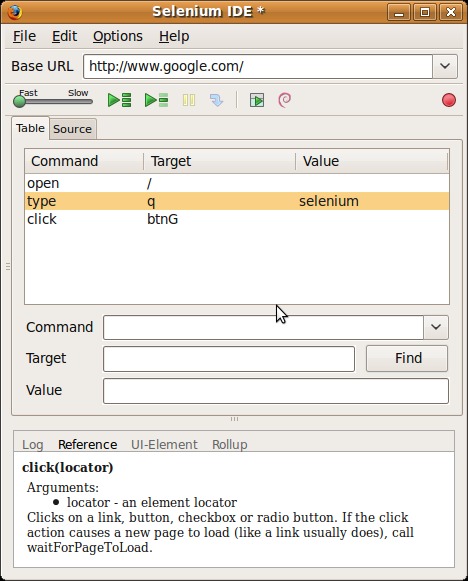
Figure 3. Selenium IDE Screen Capture
Selenium recorded the manually entered commands. This test case now can be played back using the IDE, saved as HTML or exported in a variety of formats, including ready-to-run code snippets for Selenium RC. The exported test case looks very similar to the handwritten code above, although in this case, I exported it in Python in order to demonstrate some of Selenium's capabilities:
from selenium import selenium
import unittest, time, re

class googletest(unittest.TestCase):
    def setUp(self):
        self.verificationErrors = []
        self.selenium = selenium(
              "localhost", 4444,
              "*chrome", "http://www.google.com/")
        self.selenium.start()

    def test_googletest(self):
        sel = self.selenium
        sel.open("/")
        sel.type("q", "selenium")
        sel.click("btnG")

    def tearDown(self):
        self.selenium.stop()
        self.assertEqual([], self.verificationErrors)

if __name__ == "__main__":
    unittest.main()
Note that in addition to using a unit-testing framework, the code above differs from the Perl example by using the "*chrome" browser string instead of "*firefox". This is one of the most confusing issues with Selenium, and it deserves a section of its own here.
Before I go into the really confusing details of this parameter, it is important to understand that even though Selenium is not a new project, it still is under active development, and as it sometimes happens with open-source projects, some of the development effort that went into introducing new features might have been better spent debugging old ones and making it more stable. As a result, in certain configurations, some Selenium features might not work as expected, and others may not work at all.
The browser string parameter not only specifies the browser Selenium will work with, but also the method Selenium uses to control the browser and the mode of communication between the Selenium server and the Selenium Core running inside the browser. And, yes, there are multiple modes for some browsers. Not all modes are implemented for every browser, and some Selenium commands will not work with certain modes. To add to the confusion, the default modes sometimes change between different Selenium versions. In Selenium version 1.0 "*firefox" is an alias for "*chrome" and "*iexplore" for "*iehta".
This explains why the automatically generated Python code produced a different value for the browser string than was used in the manually produced Perl code, even though both tests used Firefox. Both the "*chrome" and "*iehta" browser profiles implement a “native” approach in which Selenium uses a browser-specific method to “inject” the Selenium Core JavaScript code and to control the browser, as opposed to a Proxy Injection (PI) mode, which is generic and, at least in theory, should work with all browsers.
When Proxy Injection mode is enabled, Selenium RC, which has a built-in HTTP proxy server, configures the custom profile of the browser under test to work with its local proxy. Every HTTP response returned by the proxy server has had the Selenium Core JavaScript code “injected” into the <head> HTML element.
By design, the Proxy Injection mode works with all browsers, even those that were not tested with Selenium, as long as the browser supports JavaScript and an HTTP proxy. Not only that, but it also allows circumventing the “same origin policy”—that is, it allows you to test different sites on different domains during the same Selenium session with browsers for which the “native” mode is not complete, for instance Opera. At this point, you may think that this is the mode you should use for your tests, but unfortunately, during Selenium's development the developers discovered that some important functionality is very hard to implement in PI mode. As a result, most developers gradually switched to the so-called native mode, even though it requires a separate implementation for every browser. As a result, the PI mode is poorly maintained and quite buggy.
As you can see, even though it is often praised for its multiple browser testing capability, in reality, browsers other than Firefox and Internet Explorer are poorly supported. At the end of the day, if you have to ensure that your Web site looks and works correctly under all important browsers, your best bet may be a browser screenshot tool, such as BrowserShots or BrowserSeal. BrowserShots is a Web-based screenshot service supporting a wide range of browsers that unfortunately suffers from long response times. BrowserSeal, on the other hand, is a standalone application running on your PC optimized for Web site screenshots. It produces screenshots in a few seconds, compared with a few minutes for BrowserShots; however, there is only a Windows version available at the time of this writing.
At first glance, it looks like Selenium RC supports enough parallelism that any additional distributed processing capability would not be needed. After all, a single Selenium RC server allows you to open a number of parallel sessions (that is, drive a number of browsers at the same time) and a single Selenium RC client. In addition to being able to work with multiple concurrent sessions of one server, it can communicate with multiple servers at the same time.
However, in practice, running more than six browsers on the same Selenium RC server is not advisable due to performance issues. Additionally, managing a large number of Selenium RC servers is a major headache and does not scale very well. This is where Selenium Grid can help.
Selenium Grid introduces another component to the Selenium architecture—Selenium Hub, which manages a pool of available Selenium Remote Control entities and is responsible for the following:
Transparently allocating a Selenium RC entity to a specific test.
Limiting the number of concurrent test runs on each Remote Control.
Shielding the tests from the actual grid infrastructure.
As far as your RC client programming is concerned, the move from Selenium RC to Grid requires minimal code changes. All you have to do is to change the infamous browser string parameter. For instance, change "*firefox" to something like "Firefox on Windows" or "Safari on Mac".
Selenium Hub's configuration is a bit more complex. First, you have to modify the grid_configuration.yml file. Let's say you want to use two RC instances—one with Firefox on Linux and another with Internet Explorer on Windows. In that case, your configuration file will look like this:
hub:
   port: 4444
   environments:
       - name:    "Firefox on Linux"
         browser: "*firefox"
       - name:    "IE on Windows"
         browser: "*iexplore"
After that, you should use ant to launch the Selenium Hub by running ant launch-hub on the hub machine. The RC instances are created by running the following commands, one on a Linux machine and one on a Windows machine.
On the Linux machine:
ant -Denvironment="Firefox on Linux" \
    -DhubURL=http://<hub-IP-address>:4444 \
        launch-remote-control
On the Windows machine:
ant -Denvironment="IE on Windows" \
    -DhubURL=http://<hub-IP-address>:4444 \
        launch-remote-control
After that, you can code your RC client to use any of the above RC server instances via the hub.
Comprehensive description of the Selenium API is beyond the scope of this article, but the list below demonstrates what the framework is capable of:
$sel->click($locator) — Clicks on a link, button, check box or radio button.
$sel->context_menu($locator) — Simulates opening the context menu for the specified element (as might happen if a user right-clicks on the element).
$sel->focus($locator) — Moves the focus to the specified element.
$sel->key_press($locator, $key_sequence) — Simulates a user pressing and releasing a key.
$sel->mouse_over($locator) — Simulates a user hovering the mouse over the specified element.
$sel->type($locator, $value) — Sets the value of an input field, as though you typed it in.
$sel->check($locator) — Checks a toggle button (check box/radio).
$sel->select($select_locator, $option_locator) — Selects an option from a drop-down menu using an option locator.
$sel->submit($form_locator) — Submits the specified form.
$sel->open($url) — Opens a URL in the test frame.
$sel->open_window($url, $window_id) — Opens a pop-up window.
$sel->go_back() — Simulates a user clicking the back button in the browser.
$sel->get_location() — Gets the absolute URL of the current page.
$sel->get_body_text() — Gets the entire text of the page.
$sel->get_text($locator) — Gets the text of an element.
$sel->get_selected_indexes($select_locator) — Gets all option indexes for the selected options in the specified select or multi-select element.
$sel->get_all_links() — Returns the IDs of all links on the page.
$sel->wait_for_condition($script, $timeout) — Runs the specified JavaScript snippet repeatedly until it evaluates to “true”.
$sel->get_cookie() — Returns all cookies for the current page under test.
$sel->wait_for_text_present($text, $timeout) — Waits until $text is present in the HTML source.
For more details, check the Perl API link at the end of the article. API documentation for other languages is available as well. If you find that the API is lacking somewhere, you always can extend it by executing your own JavaScript functions using $sel->get_eval($script).
As you've seen, Selenium is a powerful Web application testing tool that supports many different languages and has a number of different frameworks built around the Selenium Core. It's an open-source project with an active community, which, at the time of this writing, is working full steam on version 2.0, which will include many new exciting features.
Resources
Selenium Web Site: seleniumhq.org
Selenium Perl API Documentation: release.seleniumhq.org/selenium-remote-control/1.0-beta-2/doc/perl/WWW-Selenium.html
BrowserShots Cross-Browser Screenshot Service: browsershots.org
BrowserSeal Fast Cross-Browser Screenshot Application: www.browserseal.com
Alexander (Sasha) Sirotkin has more than ten years' experience in software, operating systems and networking. He currently works on the LTE (Long Term Evolution) Project at Comsys Mobile and lives with his wife and kid in Tel-Aviv, Israel. Alexander can be reached via e-mail at sasha.sirotkin [AT] gmail.com.



