
jsormdb--an Embedded JavaScript Database
The (almost) standardization and acceptance of JavaScript as a browser-side development language has enabled the rapid growth of dynamic Web applications. These applications often look and feel as snappy as native desktop applications. Add the excellent open-source client-side development frameworks, like jQuery and ExtJS, along with the communicative power of AJAX, and you have an incredibly powerful and largely open browser-side development platform.
It has gotten so powerful, in fact, that applications are living entirely within the browser, with the server acting as a simple file store. One excellent example is password managers, like Clipperz and jkPassword. These work entirely in the browser to provide the user interface and encryption. The only services provided by the server are serving the static HTML and JavaScript files, and persisting the already-browser-side-encrypted file.
As the client side grows, and self-contained applications like these password managers increase, the need for basic services that are normally available in a development environment increase. In a normal development environment, the ability to manage data reliably is one of the first and key issues tackled. Sometimes, it leads to full-blown client-server database systems, like Oracle or MySQL. In other instances, it leads to embedded databases—for example, Apache Derby, which are critical for managing data within a single instance of an application.
Unfortunately, our browser development platform has lacked any such data management system. As it turns out, the availability of such a system is even more critical in the browser environment than in a server environment. For complete browser applications, the entire data set and transaction semantics are local and cannot depend on a server. For more traditional server-driven applications, the need is even more acute. Whereas a server can rely on redundancy, high bandwidth and low latency to its data store, the browser has none of these attributes. It becomes critically important for the browser application developer to be able to perform the majority of the application's data activities locally, sending the result to the server with the lowest frequency and bandwidth possible.
Enter a new class of data stores, embedded JavaScript databases. This article introduces jsormdb, an advanced JavaScript database engine. jsormdb includes most of the features you, as a developer, would expect in an embedded database system, as well as many that make sense only within the context of a browser environment. I describe jsormdb and its basic usage, including creating a database, loading data, modifying and querying the data, and transactions. jsormdb also supports event signaling and, critical for a browser-side data store, persisting changes or the entire data set to the server, but those are the subject of another article.
As anyone who has done even a moderate amount of development knows, data storage structures are, in many ways, the fundamental building block of any application. There are several good reasons for this:
Performance: choice of data structure can have a significant impact on application performance. For example, using a linked list versus a serial array is slower to access elements in the middle of the list, but much faster at list reorder and element insertion/addition/removal.
Usability: a standard data structure makes it much easier for someone else (or you) to understand what your application does and how.
Separation of concerns: by separating data structure and storage from business logic, you are able to work with each separately.
A good database structure addresses those concerns, while providing the following features:
Queries: you will want to query your data to discover which elements of the data—for example the first, 35th and 60th records—match certain arbitrary criteria. Of course, big RDBMS systems excel at this, and even have their own language for doing so, SQL. Of course you're not about to embed Oracle or MySQL type systems into a JavaScript environment, just to support local temporary queries.
Indexing: if you go to an arbitrary array or table of data and ask it to return all the records where the third field is equal to 2, you (or your data store engine) will need to go to each and every record and check whether the third field is equal to 2. This is called a full table scan, and it is terribly inefficient. For fields that are checked frequently, you would much prefer a more efficient method, one that does not require checking every single record linearly. This is known as indexing.
Transactions: in a simple world, events are single-stage and one-way. For example, login is a simple process: you enter your credentials and are either in or out. In the real world, however, events usually are multistage. For example, in order to transfer $100 from your checking account to your savings account, you need to deduct $100 from your checking account and add $100 to your savings account. Ideally, both steps will succeed. If both fail, it is not great, but you can live with it. However, if only one of the two succeeds, either you (if it is the deduction) or your bank (if it is the addition) will be very unhappy.
Events: sometimes, you want the database to tell you whether something of significance has occurred. For example, you may want to know that a certain table has been updated or perhaps that an account balance has dropped below a certain threshold. Many databases support events, often known as triggers, that cause reactions.
Because I am discussing the browser environment, one additional feature is important: persistence. A browser environment is a transient one; the moment users close their windows, all of the data is lost. Because the browser application relies on the server to provide permanence, you want a way to handle both loading your local data store from, as well as persisting our local changes back to, that server seamlessly.
jsormdb provides a solution to all of these problems. When configured correctly, the presentation and business logic within your application can treat jsormdb as the entire data store, leaving jsormdb to handle persistence to/from the server. Without jsormdb, your application looks like Figure 1.
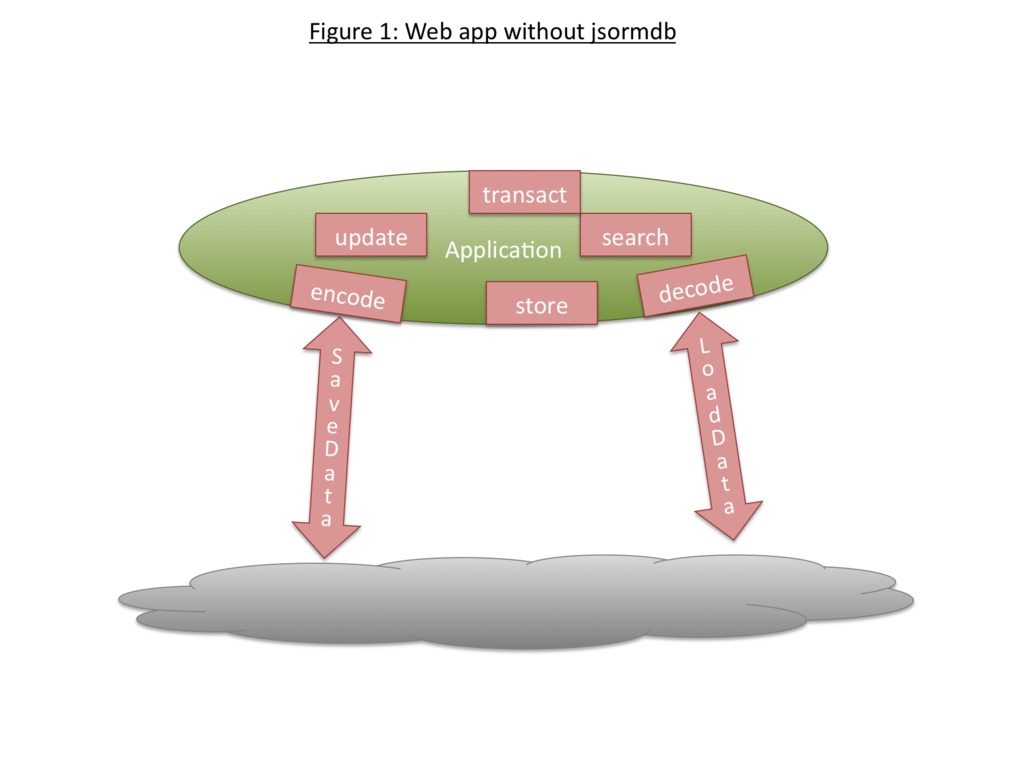
Figure 1. Web Application without a Database
With jsormdb, you can work with a much cleaner design (Figure 2).

Figure 2. Web Application with a Database
The jsormdb library introduces several concepts and implementations that are necessary for creating and using a database. Note that all of these are detailed in the JavaScriptDoc distributed with jsormdb, in the doc folder.
The database: this class is JSORM.db.db(), and it represents a single database instance.
The parser: responsible for taking input data and transforming it into records that are stored in an instance of JSORM.db.db or taking entries in a jsormdb database and transforming them into an acceptable output format. For example, the data you load into the library may be in JSON, XML, JavaScript objects or even Pig Latin. jsormdb does not care, provided you provide a parser that can convert between your preferred encoding and an array of native JavaScript objects. jsormdb comes with a parser for JSON and Objects; an XML parser is being developed.
The channel: responsible for loading data from or saving data to a remote data store. An HTTP channel can use AJAX to retrieve data from and post data to the server from which the Web page itself was loaded. You also can use another jsormdb as a source for your database, but a channel for that is unnecessary.
Putting it all together, you can create a database instance JSORM.db.db that retrieves data via HTTP from your server using JSORM.db.channel.http and parses it in JSON format using JSORM.db.parser.json. Figure 3 shows how all the pieces work together.
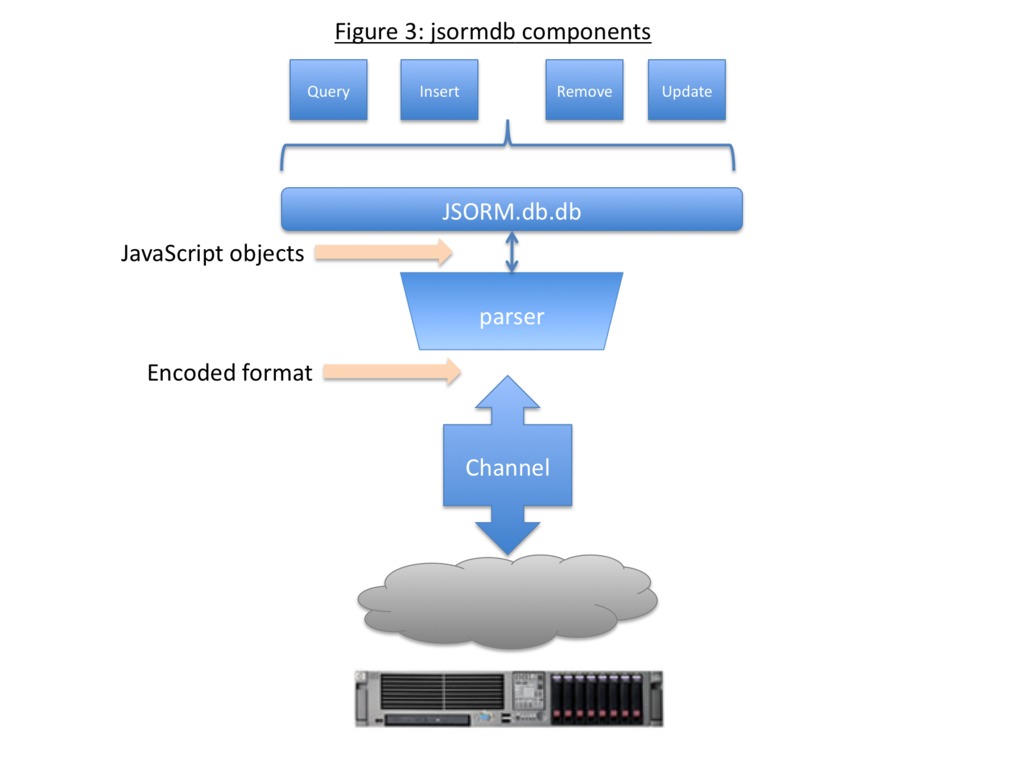
Figure 3. Fetching and Parsing Data from the Server
It is important to note that all classes follow Douglas Crockford's principles and are instantiated directly, without the “new” keyword:
var parser = JSORM.db.parser.json();     // right
var parser = new JSORM.db.parser.json(); // WRONG!
As much as possible, jsormdb semantics follow those of classical SQL. Thus, adding records is an insert; modifying records is an update, and so forth.
Installing jsormdb involves a few simple steps.
1) Download and unzip the library from the jsorm site, where it is available as a zip file from the Download link.
2) Install the library. The download includes two versions of the library. jsormdb.js is minified at just under 25KB. jsormdb-src.js is not minified, is used primarily for debugging and is 77KB. You can reduce their sizes further with gzip. You need to install the library you want to use in a path accessible to your browsers. For the purposes of this example, install file jsormdb.js in the same directory as your Web page.
3) Include the library in your Web page. Normally this is done in the header as follows:
<script type="text/javascript" src="jsormdb.js"></script>
Now that you have downloaded and installed the library, as well as included it in your page, you are ready to create a database.
In the simplest form, you create a database by simply instantiating it:
var db = JSORM.db.db();
Although this creates a database, you may want to add some initial configuration parameters. For example, you may want to indicate the parser and/or the channel to use, or even to load some data directly.
jsormdb supports loading data in two ways: directly, using raw data, and remotely, via a channel:
var conf, db;
// to use a channel and parser
conf = {
    channel: JSORM.db.channel.http({updateUrl: "/send/text.php",
                                    loadUrl:   "/receive/text.json"}),
    parser:  JSORM.db.parser.json()
}
db = JSORM.db.db(conf);

// to load data directly
conf = {data: [{name: "Joe",   age: 25},
               {name: "Jill",  age: 30},
               {name: "James", age: 35}]}
db = JSORM.db.db(conf);
JSORM.db.db has many options for instantiation. See the API docs or the Wiki entry, both of which are listed in the Resources for this article.
Whichever manner you choose to load data, jsormdb expects the data passed to it to be an array of simple JavaScript object literals. jsormdb is not rigid about the data structure, and it does not care what fields exist on each object. Both of the following are equally valid:
data = [{name: "Joe",   age: 25},
        {name: "Jill",  age: 30},
        {name: "James", age: 35}];

data = [{name:      "Joe",   age:  25},
        {firstName: "Jill"},
        {surname:   "James", city: "London"}];
An important note about the records is that each can have a type. When a record has a type, it is specially marked and can be searched more easily along with others of the same type. This can improve search times greatly, akin to putting records in different tables in an RDBMS:
data = [
	{name: "Joe",     age: 25,         type:   "person"},
	{name: "Jill",    age: 30,         type:   "person"},
	{name: "James",   age: 35,         type:   "person"},
	{name: "Fiat",    color: "yellow", type:   "car"},
	{name: "Ferrari", color: "red",    type:   "car"},
	{name: "GM",      color: "white",  type:   "car",
	                                   status: "bankrupt"}
	];
In order to make the database useful, you need to be able to retrieve records you inserted or loaded—that is, you need to query the database. To do this, you simply call db.find(query). The results will be an array of JavaScript objects that match your query. If no records match, an empty array is returned. If the query itself is invalid, a null object is returned.
The query parameter itself is an object with two fields: “where” and “fields”. The where field informs the database what you need to match in order to retrieve the record. It can be a simple match, or it can be a compound match, joining multiple simple or compound matches into a single larger one. The fields field can be used to restrict which fields are returned from the records that are found:
var where, results;

// simple, retrieves all records where the name field equals "John"
where  = {field: "name", compares: "equals", value: "John"};
results = db.find({where: where});

// compound, retrieves all records where name equals "John"
// or name equals "Jack"
where = {join: 'or',
         terms: [
                {field: "name", compares: "equals", value: "John"},
                {field: "name", compares: "equals", value: "Jack"}]};
results = db.find({where: where});
Compound terms can be joined by 'and' or 'or'. Simple terms can match on any field and can compare the field using one of many conditions, such as “equals”, “in”, “starts”, “gt” and so on. The API docs and Wiki entry, listed in the Resources for this article, have a complete list.
Finally, you can restrict the search, at any level, by the type of record to retrieve. The type field, if available, is always indexed, leading to much faster searches:
// all records of type "car" where age >= 12
where   = {field: "age", compares: "ge", value: 12, type: "car"};
results = db.find({where: where});
It is important to note that the results of a db.find(query) will return a copy of the records, not the originals themselves. Thus, it is safe to modify the returned results at will.
You can modify data in one of several ways: remove records, add records or change records.
Adding records is fairly straightforward. Simply call db.insert(data), with the data an array of JavaScript object literals:
data = [{name: "Jack",  age:  80},
        {name: "Sam",   age:  22},
        {city: "Paris", type: "location"}]
db.insert(data);
Where these records actually will physically be inserted into the jsormdb database is irrelevant, just as it is in any true database. All that matters is that the records are inserted, and that you can retrieve them.
To remove records, just call db.remove(query). The query parameter is exactly the same as in db.find(). All records that match the where will be removed immediately.
To change records, just call db.update(data,query). The query parameter is exactly the same as in db.find(). The data parameter is a single JavaScript object that has the fields to update. All records whose fields match the where will be updated:
// for every record where the age >= 40, change the age to be 35
var update, where;
where  = {field: "age", compares: "ge", age: 40};
update = {age: 35};
db.update(update,where);
As noted earlier, transactions are crucial to anything other than trivial events. jsormdb provides advanced transaction processing to allow you to manage your changes properly.
Transactions are always enabled. From the moment you load a database, a new transaction is started. All the changes you make—update, remove, insert—are tracked by jsormdb. When you have reached the end of your transaction, you must either commit the changes or reject them.
If you commit the changes, all of the change tracking is thrown away, and a new transaction is started. From that point forward, you cannot undo any of your previous changes. On the other hand, if you reject the changes, all of the changes from the beginning of the transaction—either the last load or the last commit or reject—are undone. Additionally, if you want, you can reject only some of your changes. For example, if you have made eight changes in this transaction, and you want to undo only the last four, you can do so. This is particularly useful in the user-interface environment. For example, if you have written a Web 2.0 spreadsheet application with jsormdb as your data store, you probably want to give users the ability to undo each of their changes, one by one, in reverse order, probably using Ctrl-Z on Windows and Linux or Cmd-Z on Mac. Until jsormdb, you would have to code the tracking of these changes manually. Now, you can simply delegate this function to jsormdb. Each time users click Undo, they reject exactly one change.
The following example starts with three records, adds two more, modifies one and removes one:
var data, where, db, recs;

// create and load the database
data = [{name: "Joe",   age: 25},
        {name: "Jill",  age: 30},
        {name: "James", age: 35}];
db = JSORM.db.db({data: data});

// add records
db.insert([{name: "Karl", age: 40}, {name: "Karyn"}]);

// modify Joe
db.update({data:  {age: 26},
           where:
               {field: "name", compares: "equals", value: "Joe"}});

// remove James
db.remove({where:
               {field: "name", compares: "equals", value: "James"}});

// get all of the data
recs = db.find();
// recs = [{name: "Joe",   age: 26},
//         {name: "Jill",  age: 30},
//         {name: "Karl",  age: 40},
//         {name: "Karyn"}]

// we can commit, reject or partially reject
db.commit();  // all changes are saved and a new transaction starts
// OR
db.reject();  // all changes are rolled back;
              // db.find() returns [{name: "Joe",   age: 25},
              //                    {name: "Jill",  age: 30},
              //                    {name: "James", age: 35}]
// OR
db.reject(1); // just the removal of James is rolled back
Last but not least, commit() can cause jsormdb to update the server with its new data in one of several formats, and it even can update itself based on the server's response. This persistence of changes, which uses jsormdb to mediate between browser-side business logic and presentation on the one hand and server-side storage on the other, is the subject of another article.
In summary, jsormdb provides Web browser application developers the ability to isolate data management from business and presentation logic cleanly, to utilize full transaction semantics easily and to query, update and modify data, including indexing, simply and efficiently.
Resources
jsorm Site: jsorm.com
jsorm Wiki: jsorm.com/wiki
jsorm API Docs: jsorm.com/doc/api
jsormdb Samples: jsorm.com/doc/samples/jsormdb.html
Douglas Crockford's JavaScript Site: www.crockford.com
MySQL: www.mysql.org
Oracle: www.oracle.com
Avi Deitcher is an operations and technology consultant based in New York who has been involved in technology since the days of the Z80 and Apple II. He has a BS in Electrical Engineering from Columbia University and an MBA from Duke University, and can be reached at avi@atomicinc.com.



