Xfig
Need a schematic diagram for a paper? How about a floorplan of a house? A title page for a report? Or do you need to add text to an existing PostScript figure? Xfig can do all that. Xfig (facility for interactive generation of figures under X11) is a drawing program that provides a powerful (forget Windows Paintbrush!) tool to get the look you want.
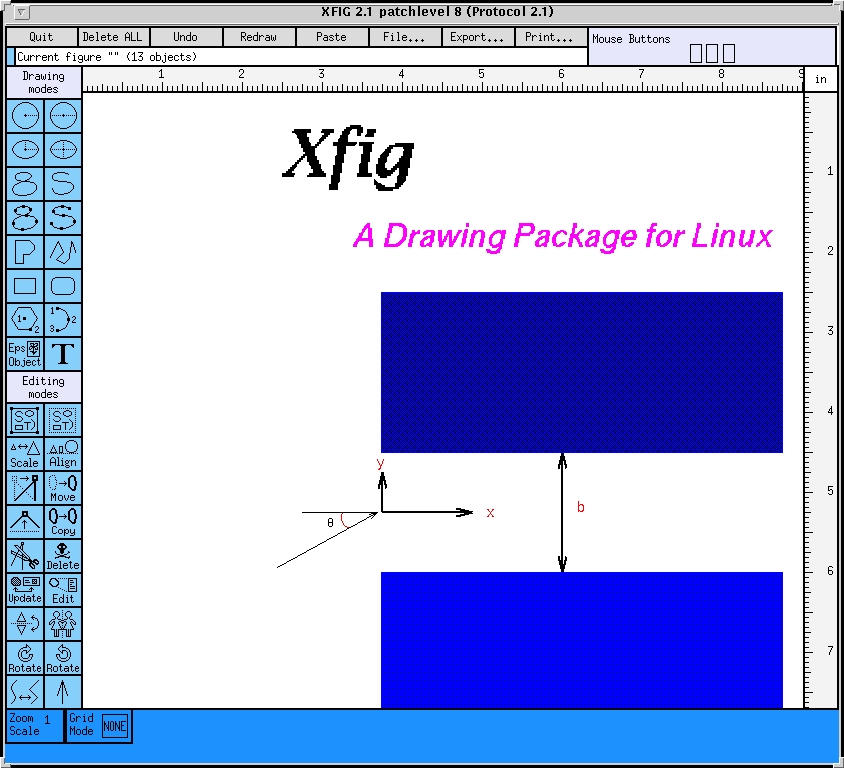
Typing xfig brings up a window with a variety of panels. You make (and edit) drawings with the tools along the left side of the window as shown in Figure 1. The top half of the column is the drawing modes panel. It includes tools for creating two types of circles (starting at the center - the left choice - or starting with a point on the circle), ellipses (same options), a variety of splines (that go through your points or near control points), arcs, line segments, open and closed figures and text. You can also import PostScript figures to embed in your drawing. Any figures that you make can then be moved, scaled, flipped, copied to other parts of the drawing, or rotated using the editing mode panel.
To make a circle, click your cursor on the left circle tool in the drawing mode panel. Now move to the drawing canvas and click again. This places the center of the circle at that point. Now move the cursor in any direction until the growing circle on the canvas is the size you want. Click the left mouse button again to fix the circle in place. If you don't like it, click the right mouse button and the circle disappears, allowing you to start over. (Or you can select the undo button on the top line of the window.) To pick a different shape, click on another drawing mode tool. Most of the other drawing tools work about the same way.
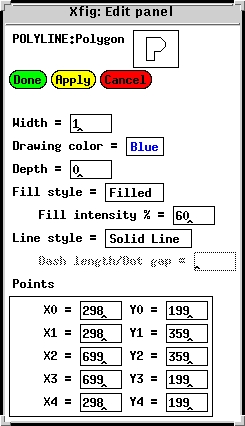
If you are the least bit unhappy with your figure, edit it using the editing mode panel. Individual objects can be moved by use move mode: click the left mouse button on the object, move the cursor to the new location and click again. (The right mouse button cancels the move.) Clicking on some types of objects brings up an edit panel, which allows for micro-adjustments to the shape and characteristics of the object. Figure 2 shows the edit panel that corresponds to the upper blue box of Figure 1.
The box is blue, as is the lower box, but the intensity is 60%, while the lower box is 95%. Using the edit panel, the color could be changed to seven others (counting black and white) and the intensities can be varied. The point box shows the x and y coordinates. Each value may be changed by editing the boxes. For other shapes, such as a polyline (made of a connected series of line segments), individual points can be moved, subtracted or added to change the shape of the line.
Text fonts, line thicknesses, and colors all can be changed before drawing an object by using the indicator panel at the bottom of the Xfig window. These buttons change according to the mode you have chosen. One neat feature is the smart-links mode used when moving objects. Lines connecting boxes in your figure expand or shrink with the movement of a box, keeping everything connected. This helps when you want to move things in flow and organizational charts.
The man pages for Xfig serve as a complete user's manual, providing much more detail than I have here. You can print them with man -t,xfig| lpr -Plp , with the - t , providing a formatting appropriate for a PostScript printer named lp . Besides describing all the features, the man page provides details about changing the default parameters. I aliased xfig to xfig -P -e ps -startf 16 , so that my default export parameters are portrait rather than landscape on the PostScript formatted page, and the font size starts up at 16, instead of the 12 point default size.
Xfig will export your drawing in a variety of formats, such as PostScript, Latex (and PicTex), X11 bitmap (xpm), PIC and HPGL, for printing or including into a document - in color and with the fonts you want. You can do the exporting from within Xfig or via postprocessing using fig2dev , which comes with Xfig.
fig2dev -L ps NAME.fig NAME.ps converts NAME.fig to a PostScript file, NAME.ps. The other valid graphics language (-L) options are box, epic, eepic, eepicemu, ibmgl, latex, null, pic, pictex, ps, pstex, pstex_t, textyl, and tpic.
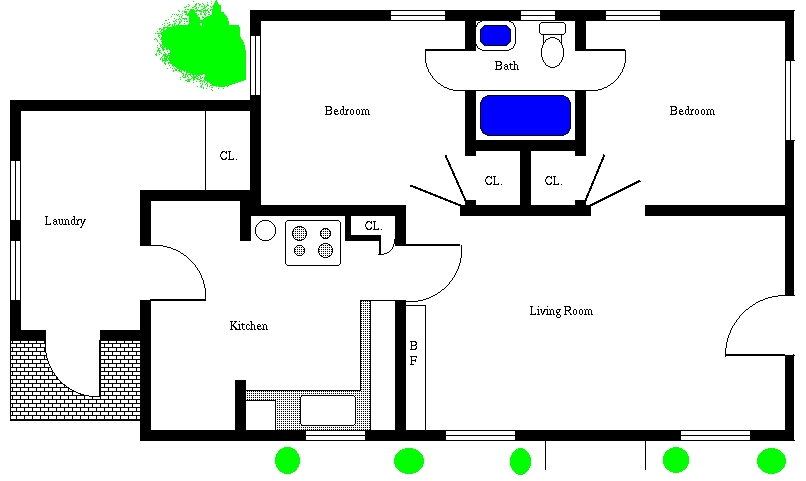
To add extra flourishes to your drawing, trying using xpaint along with xfig. Xpaint is a simple-to-use paint program, written by David Koblas, that will import xbm (X11 bitmap) from xfig and save the result in a variety of formats, including PostScript. Figure 3 gives an example of effects that you can add to Xfig-generated drawings with Xpaint.
Xpaint comes up with a toolbox filled with a variety of painting tools. The file button opens a new canvas, retrieves an old canvas, or imports a figure. Once the canvas is open, a palette is presented for colors and patterns at the bottom. Getting around xpaint is very simple and a credit to its designer.
Robert A. Dalrymple teaches coastal engineering at the University of Delaware. His address is rad@coastal.udel.edu ; also coastal.udel.edu.