How to Build a Mac
If you have been browsing through Linux newsgroups, you may have heard some talk about a new Macintosh emulator called Executor (pronounced ig-zek'-yu-tor). When we (Andreas Schiffler, a long time Linux user, and David Moody, a die-hard Mac fan) first heard about this program, our interest was sparked: finally, some common ground on which to relate! We investigated and wrote this review for Linux Journal to give readers some idea of whether this commercial product will bridge the gap between these two completely unique operating systems, and also to give the Mac-illiterate Linux user a head-start on using the program.
Executor, a product of Abacus Research and Development, Inc. (ARDI), is “a commercial emulator that allows non-Macintosh hardware to run some applications originally written on a Macintosh”. Recently, a version for Linux has become available. This review is based on a pre-beta version, 1.99o, which was current at the time of evaluation. It should be noted that this pre-beta version has many known bugs which ARDI is addressing for its official 2.0 release of Executor.
Executor is available as a demo for evaluation purposes. The demo is a fully functional version which is limited to 10 minutes of use, a limitation which can be removed by obtaining a serial number and registration code, which you are granted when you purchase it.
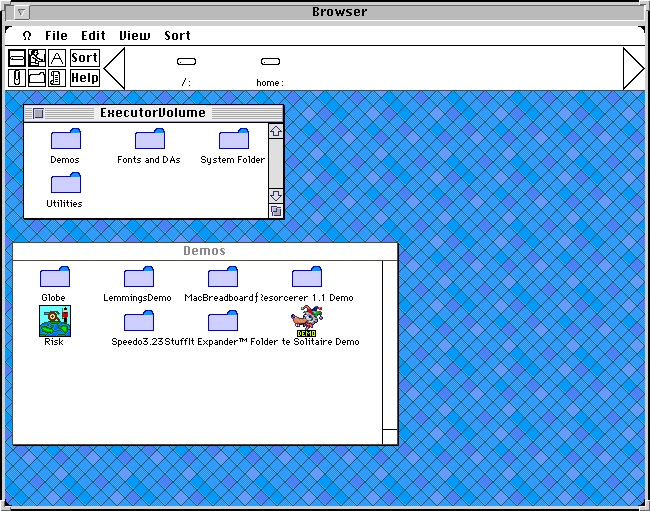
The demo can be obtained from various Linux FTP sites, including ftp://sunsite.unc.edu/pub/Linux/system/Emulators/, or from the official (but slower) ARDI FTP site at ftp.ardi.com. For installation, we obtained the 3 MB archive, unarchived it with tar xzf executor199o.tar.gz changed directories with cd executorlinux199o and ran make as root. This copied the executable into /usr/local/bin/executor and created a Macintosh “volume” in /usr/local/lib/executor/. A quick look into its sub-directories reveals that Executor uses the native file system with additional emulator-specific files (prefixed by a %); the file system is seamlessly integrated into your Linux system. The current version is only supported under X-windows, but an SVGALIB version for those without X is in the works. Typing executor in an X-terminal brings your new Mac to life. (See Figure 1.)
The first thing David (the Mac expert) noticed is the slightly non-standard setup. Instead of the “Finder” desktop (which Macs use to find and run programs on the hard drive), Executor runs its own “Browser” program. The main difference is the presence of a “hot band”, located just below the menu bar. This band contains a help button, which gives help on using the hot band, and 6 application grouping buttons for making quick reference icons. Basically, the Browser is a slightly watered-down version of the Finder; we found it fairly easy to use, but lacking a bit in on-line documentation and color.
The Mac system is not completely emulated, so there are some features which are handled differently in, or are absent from, Executor. For starters, the keyboard is slightly different. Macs have two keys which are absent from the PC keyboard, the option key and the

key, and the Mac has no Alt keys. Executor uses the left Alt key as the
key and the right Alt key as the option key. Since the
key is often used as an accelerator key, the documentation could have been a bit more specific about this. In future releases, a README.FIRST summarizing these topics, for people who don't want to read the fairly extensive FAQ before running executor, might be a useful addition.
Floppy disks are also handled differently from a real Mac, and some insight in Executor floppy disk handling is required to avoid hangups. On a Mac, inserting a disk immediately causes an icon to appear on the desktop; in Executor, you have to press
-shift-2 once the disk is in the drive and choose Eject before a disk is taken out.
This is how disk swapping encountered during the installation of program is handled as well. This is very important to note, as clicking the “OK” button during a disk swap before pressing
-shift-2 will result in a segmentation fault, and it's “game over” for Executor. Note, however, that this is explicitly an experimental release of Executor, and faults that we encountered may well be corrected in version 2.0, which will probably be released by the time you read this. As mentioned in the FAQ, Executor cannot read 800K Mac disks, because PC floppy drives are physically incapable of doing so. The current version hangs for a long time when a 800K disk is inserted and the disk-check option is selected. This is annoying but should be no problem for most people—if you are aware of it.
Executor has only a little System 7.x support, which is the current incarnation of the Mac operating system. This will only affect programs which use the special features of System 7.x. Also, Executor won't load CDEV's (Macintosh control panels) or INIT's (modular extensions to the system)---that means no QuickTime, After Dark, etc.
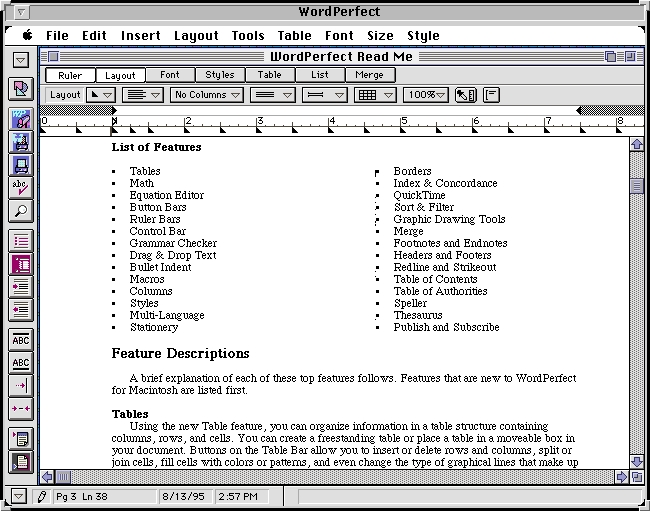
Now we decided to get down to work and install WordPerfect 3.0. Programs like WordPerfect have a particular use for Executor/Linux users who want to use commercial productivity applications that are not yet available under Linux or who simply want to make use of their old documents without having to switch operating systems. The WordPerfect installation requires knowing how to handle floppies under Executor, as mentioned above, but completes speedily and without problems. A new folder is created, and a double click starts WordPerfect.
Now that was easy! In Figure 2, you can see the demo document with inline graphics and tables. According to the Readme file, Executor can send output to a PostScript-compatible filter, so we printed our document. As promised, out came our formatted document. (Our printer prints PostScript by default). So far, so good. Now the bad news. Although the basic editing and formatting appeared to work well, we were unable to get the graphic editor or the equation editor to work.
PageMaker 4.2 installation was straightforward, and we had our program up and running in a few minutes. Everything appeared to be where it should be, and all documents were displayed correctly. The functions we tried worked well, although PageMaker is mentioned in the Executor 1.99o bug list as having trouble with some file functions.
Enough real work—what did we buy a computer for anyway? On to the games.
We started with the included shareware games. Lemmings was our first choice. It worked, but it seemed quite sluggish. This is because of the way Executor handles graphics. There are two methods to choose from for color mapping: either the standard color map allocation under X-windows (dynamic) or a private color map controlled by Executor. The first option preserves the colors of the X-windows desktop, but is slow. The second option, invoked with the command line executor -privatecmap, creates some bizarre colors for the rest of X-windows, but is very fast. When we re-ran Executor with the -privatecmap option, Lemmings blazed.
We ran the other two included games, Solitaire and Risk, without incident. On to the private stock. The FAQ sheet claimed that Wolfenstein 3D worked under Executor, so we loaded it up. Technically, it did work. However, even with the fast color option, it was unbearably slow. Perhaps we were pushing the limit a bit—or did we have to fiddle with more preferences? We tried installing Populous, but no amount of prodding would get it working.
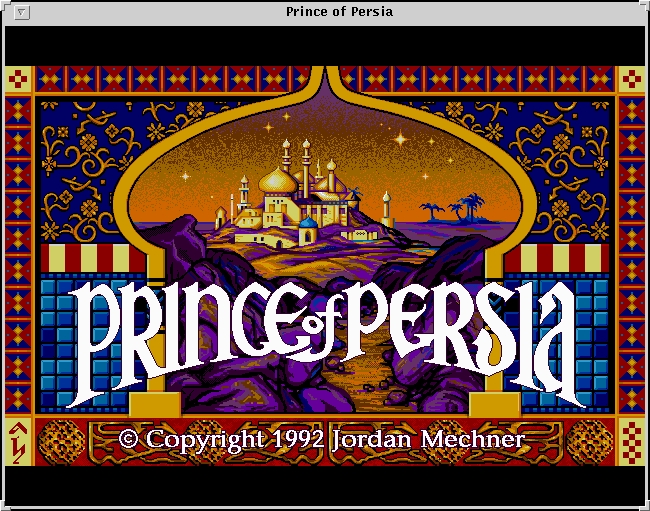
We had more luck with Prince of Persia (Figure 3). It ran right off the floppy disk—and was it ever fast! Our jaws dropped as we watched the emulated game outspeed the version running on our Mac. Needless to say, we were very impressed. At this point, however, it would be worth discussing the kind of machines we were using and doing some real benchmark comparisons.
ARDI includes Speedometer (Ver. 3.23) with its emulator. Speedometer performs a variety of CPU, graphics and other benchmark tests, thus providing a convenient means of comparing machines, so we used this program to perform our tests. Our main test systems were a 25 Mz, 68030LC-based LCIII Macintosh and an AMD 486 DX4-100. ARDI claims that Executor runs at 1/3 the speed of a similar-speed Macintosh, so these systems should be roughly comparable in speed.
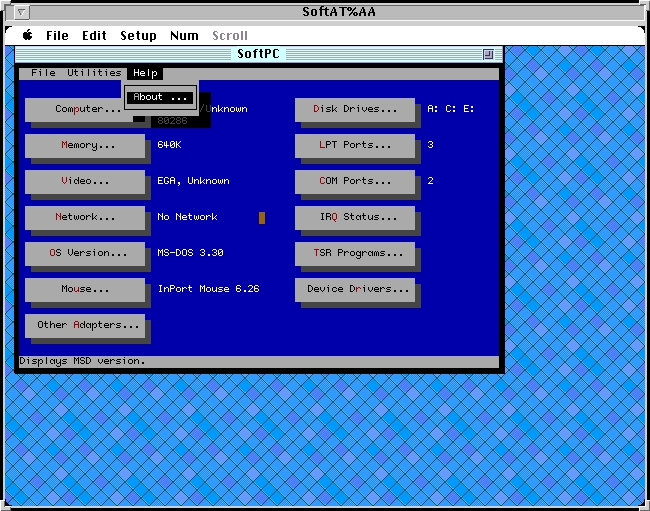
For our final software test, we decided to stack our emulators. With some trepidation, we booted up Executor, and loaded a program called SoftAT which is—you guessed it—a DOS emulator for Macintosh. Did it work? You bet. We even managed to mount an E: drive under SoftAT to the directory /dos, which was a DOS partition mounted under Linux, provided by Executor. Got your head around that? The short version is, it was really cool. Take a look at MSD.EXE running under SoftAT (see Figure 4).
According to the FAQ and WWW site, the following programs have been tested and work properly under Executor: Entertainment: Beam Wars, Glypha III, Shatterball, Civilization, Spaceward Ho! Productivity: Claris Works 2.0.1, Microsoft Word, Microsoft Excel Utility: DropStuff Enhancer, Stuffit Expander, NIH Image, AddressBook We are sure there are numerous other programs that will run.
So what's the bottom line? If there is even a remote chance that you will ever want to run a Mac program on your Linux box, you should definitely get yourself a copy of the Executor demo. That way, you can try out any programs you have to see if they work. At the very least, you'll impress anyone looking over your shoulder!
Although we were very impressed with the experimental version 1.99x, we recommend saving your work regularly, because of the slightly unstable nature of these pre-beta releases. ARDI promises that Version 2.0, due out in October, 1995, will fix many bugs, making Executor into a very attractive product. Missing from 2.0 will be AppleTalk, sound, serial port access, and support for INITs and CDEVs.
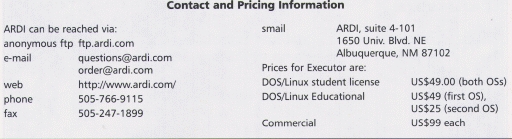
After version 2.0 has been released, ARDI will begin working on System 7.5 support, sound and serial port access, and better documentation—much needed additions. Current licensing fees are $49 for educational use, $99 for commercial use, both of which include updates up to version 2.0---which we find very reasonable.
Get the Executor demo, but be sure to read the accompanying documentation in the form of a FAQ. Take a look at the unofficial WWW pages at vorlon.mit.edu/arditop.html for more information and tips, and look around the Internet at Macintosh shareware sites, including ftp://wuarchive.wustl.edu/systems/mac/info-mac/.
Happy Mac-ing!
Disclaimer: We are in no way related to ARDI.

Andreas Schiffler is a graduate student at the University of Saskatchewan and has been a full-time Linux'er since kernel version 1.0.9. He is the co-founder of the Saskatoon Linux Group, is working on a version of the DOS classic “Scorched Earth” for Linux, and has recently developed a taste for Macintosh software. He can be reached at andreas@karlsberg.usask.ca

David Moody is also a graduate student at the University of Saskatchewan, but spends much of his time developing software through his company, Palindrome computing. David enjoys music and rabbit breeding.