
Connecting Your Linux Box to the Internet
Ever wonder what it would be like to have your Linux box connected to the backbone of the Internet? Well, maybe not the backbone—but how about a direct connection to one of the many Internet service providers? Lightning-fast response time. You could set up your very own ftp site, or perhaps a gopher or World Wide Web server. Wouldn't it be nice to have Mosaic draw heavily graphical World Wide Web pages in seconds instead of minutes at 14.4 kbps?
What does all this cost? You'd better sit down first. Comfy? Good. Assuming you already have a Linux box, startup costs are in the range of $3,000-$5,000. Monthly costs range anywhere from $500-$1,000. This generally places such a connection out of reach for most people.
However, there is currently a rapidly-expanding market for small Internet service providers, who need a faster connection to the Internet than 14.4 kbps to be competitive—and some of whom are using Linux. There are also more and more businesses becoming interested in having a presence on the Internet, and many are using Linux boxes to provide this.
In this article, I'll take you on a tour of what's required to get a direct connection to the Internet. First, I'll touch on the various software packages you'll need to understand how to manage an Internet-connected machine. Next, I'll introduce the concepts behind a direct Internet connection; I'll describe the hardware required and the different configurations available. Finally, I'll discuss how to select an Internet service provider.
You've got a lot to learn. No, seriously. And, with the cost of a direct Internet connection, the last place you want to learn this stuff is online. If you have the time to do it right, I'd suggest connecting in several stages, learning in pieces as you go along.
Let's assume you are fairly skilled at managing a Linux box. This is a skill you can learn even if your machine has no connections to the outside world. In fact, having no connections makes learning easier; it will allow you to focus on the tasks needed to maintain a Linux box. Once you are comfortable doing this, take one small step towards the Internet: Obtain a UUCP connection to your machine.
A UUCP connection is a good way to get your feet wet connecting to the outside world—it will teach you how to manage a news and mail feed. Most of the Linux distributions come with all the news and mail tools you'll need. The Mail-HOWTO guide and the News-HOWTO guide will help you configure things correctly. News and mail are the two most common services on both directly connected and indirectly connected Internet machines. These are important services that people using your machine will expect to work. Spend the time to learn how each package works. Make sure you understand how news and mail are configured. Learn what log files are produced and where they are located. When you connect your machine to the Internet, it is inevitable that you will encounter problems with news and mail. You can save yourself a lot of time and trouble by learning how these work now, rather than later.
The next step above a UUCP connection is a dial-up IP connection. Dial-up IP places your machine on the Internet like a dedicated connection, whenever you dial in. This will give you some experience running TCP/IP. You can also try running your very own ftp site, a gopher server, or even an HTTP server for WWW clients. If you expect to be running any of these services when you get your dedicated connection, start experimenting with them now. Learn how to configure them. Learn what log files are produced and where to find them. Check out the comp.info-systems.www newsgroup.
Security becomes a very important issue once you place your machine on the Internet. Any data residing on an Internet-connected machine can potentially be read by anyone on the Internet, unless your security prevents it. Now, even if you think you don't have anything on your machine that you don't mind others reading, don't think you can just brush security concerns aside. There are many documented bugs in Unix packages that allow hackers to gain access to an existing account, or even root access.
To get up to speed on security, start by reading the comp.security .unix newsgroup. It has an excellent FAQ on what to watch out for. Also check the newsgroup comp.os.linux.announce. You will find Linux-specific security holes posted here. The best method to determine just how secure your machine is, is to have someone try and break in. If you know someone who is very knowledgeable about Unix, that person would be an excellent candidate for the job. If you don't know or trust someone enough to do this, just get a few average computer people to try to break in. You'd be surprised at how many holes even the average user can discover.
At this point, if you have followed my advice, you've managed a UUCP news and mail feed. You've worked with dial-up IP. Maybe you've even tried running a gopher, ftp, or HTTP server. And, you have learned a lot about Unix security. If you haven't, do it now!
A dedicated connection means your machine is connected to the Internet 24 hours a day. This speeds up services like news and mail. Mail between two Internet-connected machines happens literally in seconds. The frequency of Usenet news updates is controlled by each site. Hourly—or even more frequent—news updates are commonplace. You also get some services that are only available to Internet connected machines such as telnet, ftp, gopher, and World Wide Web.
In order to put your machine on the Internet, you will need a dedicated line between you and your service provider. A dedicated line is a telephone line that is open 24 hours a day. What do I mean by open 24 hours a day? Say you call a friend and talk for a few minutes. Then, you walk away from the phone for a while. When you have something else to tell your friend, you pick up the phone and tell him. You don't have to dial his number again because you've never hung up. This service is billed at a fixed, monthly rate; there is no charge for usage. The phone company connects the dedicated line to the destination phone number. Only the phone company may change the destination.
You will have to decide how fast a connection you will need. The minimum speed is 56 kbps, which is perfect for a small business. If you plan on transferring audio in real-time, you will need a 1.54 Mbps line, commonly known as a T1 line. If you plan to transfer video in real-time, you'll need a T3 line which transfers data at the rate of 45 Mbps. Watch out for bottlenecks—buying a T1 line in the hopes of talking with a remote site across the country at T1 speeds is pointless if any of the other lines the data will pass through are running at 56 kbps.
Dedicated lines come in several different flavours. Analog lines can handle speeds up to 28.8 kbps. This is the same grade as your typical home phone line. You probably don't want one of these. Digital lines handle speeds of 56 kbps right up to T3 (45 Mbps) speeds. The cost of a digital line depends on the distance between you and your service provider. An alternative to digital dedicated lines is frame relay. Frame relay is the new technology on the block. Frame relay charges are based on speed, not distance; this may offer significant savings over a digital line. Not all service providers support frame relay. Check with your service provider. For the purposes of this article, I will assume you are going to go with a digital line at 56 kbps. This is the most common Internet connection.
With a dedicated connection, your Linux box is available 24 hours a day to access the Internet. But beware, the reverse is also true. The Internet can access your Linux box 24 hours a day. Keep your machine secure or you could suffer a lot of damage from system crackers. In order to prevent this, consider reading Cheswick and Bellovin's Firewalls and Internet Security, reviewed in issue 6 of Linux Journal.
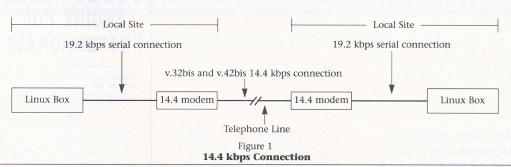
Before I describe a 56 kbps connection, let's review a connection with which you are probably more familiar: a regular 14.4 kbps modem connection. (See Figure 1 above.) A 14.4 kbps connection will require a serial port in each machine, a modem at each machine and, of course, a telephone line. The two modems communicate at 14.4 kbps using the v.32bis protocol. The serial connection between each modem and the Linux box can be set at 19.2, 38.4, or 57.8 kbps; data compression is the reason the serial connection runs faster than the modem. The modem connection is 14.4 kbps compressed with the v.42bis compression protocol; the serial connection is uncompressed. In order for the serial line to keep up with the modem connection, it must pass more bits per second than the modem. Now that you know where all the protocols fit into the picture in a 14.4 kbps connection, let's tackle a 56 kbps connection.
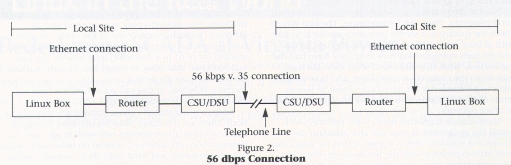
Take a look at Figure 2 (opposite). A 56 kbps connection may be too fast for your serial port, so Ethernet offers an alternative. Ethernet signals cannot be transferred over the telephone lines, so you must use a protocol specifically designed for telephone lines, v.35. What you end up with is Ethernet coming out of the Linux box, being converted to v.35 signals, and being transferred over the telephone lines to your Internet service provider. You need to install an Ethernet card in your Linux box and configure the kernel to support TCP/IP—see the NET-2-HOWTO document for the details. To convert Ethernet signals to v.35 signals you will need a router. Finally, to send the v.35 signals over the phone lines, you will need a 56 kbps CSU/DSU (also known as a digital modem).
The router with CSU/DSU is the most common configuration for dedicated connections to the Internet. Vendors are now selling hardware which combines the router and CSU/DSU into one box. The single box is cheaper, but not as flexible in case of future growth. For example, if you want to change from a 56 kbps to a 128 kbps line, you can use the same router with a 128 bkps CSU/DSU. If you go with the single box, you'll have to replace the entire unit. Take into account your plans for the future and pick the option that suits them.
It will soon also be possible to buy a v.35 CSU/DSU card that plugs directly into your Linux box. That is, it is possible to buy the card now, but the driver is still being developed as this is written. When the driver is available, this option will cost less than an Ethernet card, router, and external CSU/DSU, be a little less flexible, require that the Linux box it is attached to act as a router, and be ideal for many situations where the Linux box is being used as a firewall. On the other hand, it is a poor solution for sites with more than a few dial-in lines.
The Internet service provider business is booming right now. New companies come online each month. Service providers come in all sizes—from large, cross-country providers serving an entire country, to medium-sized, regional providers serving several nearby cities, to small providers serving only a single city.
Finding the larger providers and most medium-sized ones is easy. There are several lists of service providers available; here are a couple I have found useful:
DLIST: A list of Internet service providers that sell direct connections. Most, if not all, of the large national providers are listed here. You can get a copy of this list by sending e-mail with an empty message body to dlist@ora.com. If you have any problems getting this list, send e-mail to mj@ora.com.
PDIAL: A list of Internet service providers that offer dial-up accounts. The PDIAL list contains many more providers than the DLIST. The additional providers tend to be the small to medium-sized ones. Most of the companies listed will provide dial-up accounts only; however, if you find a provider close to you, call or e-mail them and ask if they sell dedicated connections—some of them might. To receive the PDIAL list, send e-mail to info-deli-server@netcom.com with “Send PDIAL” in the body of the note.
Finding the smaller providers that service only your city can be a little trickier. Check your city's computer paper. Check local user groups. Check with local computer stores to see if they know of anyone providing Internet access in the area. You'd be surprised how many consulting firms, out-sourcing companies, and even computer stores are using the unused time on their computer equipment to provide Internet access.
Most providers have an e-mail address you can send mail to for more information; select a few and e-mail them. Describe your site to them and the type of connection you are looking for. For example, if you have an office LAN you want to connect to the Internet, tell them. See what they suggest and how much it will cost.
Now, you have to be careful when it comes to costs. Some providers charge a setup fee. Others require you to sign a six- or twelve-month agreement with them. Some charge only for the Internet feed; you must pay the phone company directly for the dedicated line. Others combine the two charges and you pay the service provider only. Some require you to purchase a CSU/DSU at their site. Others include this charge as part of your setup fee. In the end, you'll have to decide on whether you want the flexibility of a month-to-month lease, or the extra savings of a long-term commitment.
Narrow the possible candidates down to two or three good prospects. Then, ask for references. The best way to check the quality of a service provider's service is to talk with at least three other companies using their service and get their opinions. Ask how long they have had the connection, what they like most, what they like least, how often the connection goes down, and how long it takes to get fixed. Ask for references similar to you in terms of type of connection, number of users, and type of office network.
Maintenance is another issue. Some providers will install the equipment at your site and maintain the equipment remotely; this is a good option for small sites with little experience with the hardware involved. For the more daring, you can install your own equipment at your site. You might have the odd interruption as you learn how things work, but if you don't mind this possibility, the knowledge you gain will be helpful to you later.
You still need to purchase a dedicated line from your site to your service provider's site. Some service providers take care of this for you; others require you to arrange this with the telephone company. Arranging for a dedicated line is not difficult—you could do it yourself. The advantage of having the service provider handle this is you only have one number to call if something goes wrong with the connection. If you are dealing with two companies, each may tell you the problem lies with the other's equipment and will ask you to contact the other first. If you have ever run into this vendor-roulette before, you'll know how frustrating it can be. Neither side wishes to investigate the problem until the other side has investigated things first.
If you have an existing TCP/IP network that you are connecting to the Internet, you may want to set up your Linux box as a firewall between your network and the Internet. This is done to prevent unauthorized users from accessing services you want only your local users to access. See the comp.security.unix FAQ for more information about firewalls. If you plan on connecting dial-in lines to your Linux box, I have some suggestions on the machine size and configuration. These suggestions may not work for every situation, but they will give you a starting point from which to work.
For a small operation with 1-4 dial-in modems, a 486DX33 with 16MB of RAM and a four port serial card would be a good starter system. For a medium sized operation with 4-16 dial-in modems, a 486DX33 with 32MB of RAM and a 16 port serial card might be reasonable configuration to start with. Keep in mind that the CPU speed and amount of memory needed will ultimately depend on what your users will be doing on your system. If they only read news and send e-mail, this might be more than enough. If things start slowing down, add more memory.
For a large operation with 16+ dial-in modems, try two 486DX66s with 16MB each. Put a large hard drive on one machine and NFS mount it on the other machine. With so many modems, you don't want to overburden your Linux box with serial ports. Instead, you can get a terminal server which is a piece of hardware that manages modems. Your modems plug into one end and an Ethernet connection comes out of the other. Another feature of terminal servers is they allow you to attach each modem (or port) to a different Linux box. In this case you have two machines, so assign half to each machine. If your machines are getting overloaded, you can increase memory as before, or you can get a third machine and redistribute the ports accordingly.
Keep in mind that the above systems are only suggestions; there are too many variables involved to suggest that any of the above systems will work in all cases. Your configuration will ultimately depend on how many people use your machine and what tasks they normally perform.
If you want more information about connecting to the Internet, I recommend the following books:
Connecting To the Internet, O'Reilly & Associates, ISBN 1-56592-061-9. Covers all aspects of connecting and offers a general overview of how data travels through the Internet, the different types of available hardware, how to choose an Internet service provider, and the trade-offs of dial-up IP vs. 56 kbps connections.
Canadian Internet Handbook 1994 Edition, Prentice Hall Canada, ISBN 0-13-304395-9. If you live in Canada, this is an excellent source of information on how the Internet flows through Canada; includes a list of service providers by province.
Various USENET newsgroups are also an excellent source of information. Check out the following:
comp.security.unix - Unix security issues.
comp.unix.admin - Administering Unix boxes in general.
comp.os.linux.announce - Important announcements about Linux.
comp.os.linux.admin - Administering a Linux box.
If you have a security question, ask it first in comp .security.unix. For the most part, security is the same on all flavours of Unix—it is rarely Linux-specific. If your question happens to be one of those rare cases, there are many Linux-literate readers of this newsgroup who can help you out.
Connecting your machine or network to the Internet is a huge undertaking. But if you take the time to learn how things work, you will be able to tackle this task with ease. Good luck on your connection adventure.
Russell Ochocki, B.C.Sc. (Hons), is a computer programer/analyst for a major Canadian financial corporation. He has been using Linux for over one and a half years. He can be reached on the Internet at rdo@kynes.bison.mb.ca.
Russell Ochocki, (rdo@kynes.bison.mb.ca) B.C.Sc. (Hons), is a computer programer/analyst for a major Canadian financial corporation. He has been using Linux for over one and a half years.
